

Only Admins can view or change the subscription.
Plan limits
Each plan includes a quota for:Devices
The number of phones/tablets that can enrol.
NFC Tags
How many tags you can register.
Restriction Profiles
How many profiles you can create.
Policies
How many policies you can define.
On the free tier you can try FocusFlow with a small number of tags, devices, and profiles. If you hit a limit (e.g. “NFC Tag limit reached”), upgrade your plan to add more.
Available plans
View your usage
1
Open Subscription / Billing
From the dashboard, go to Subscription (or Billing).
2
Review your plan and usage
See your current plan and how much of each limit you’re using.
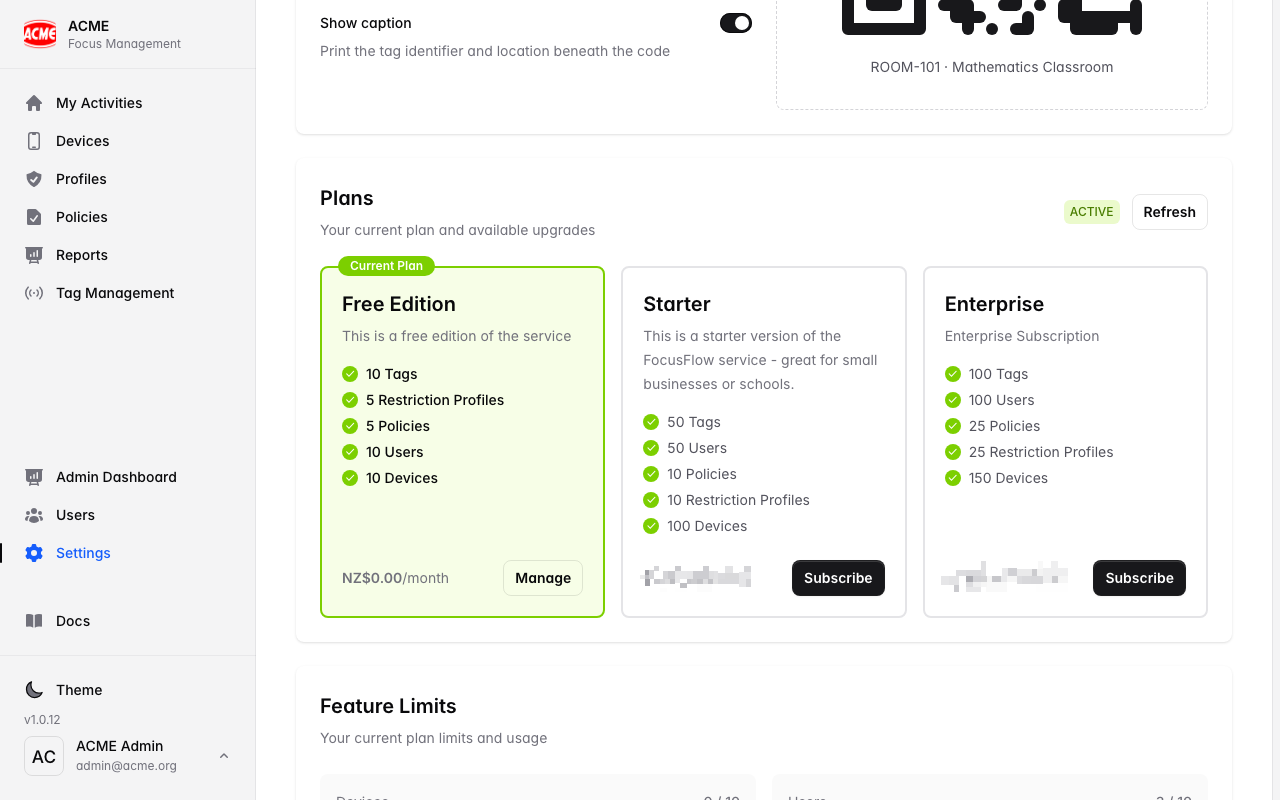
Upgrade or change your plan
1
Choose a plan
Select Upgrade and pick the plan that fits your organisation.
2
Check out securely
You’ll be taken to Stripe to enter payment details. FocusFlow never stores your card information.
3
Limits update automatically
Once payment succeeds, your new limits apply right away.
Manage billing
Use the billing portal (powered by Stripe) to update your payment method, download invoices, or cancel:1
Open the billing portal
From Subscription, choose Manage billing.
2
Make changes in Stripe
Update card details, view invoices, or change/cancel your plan.